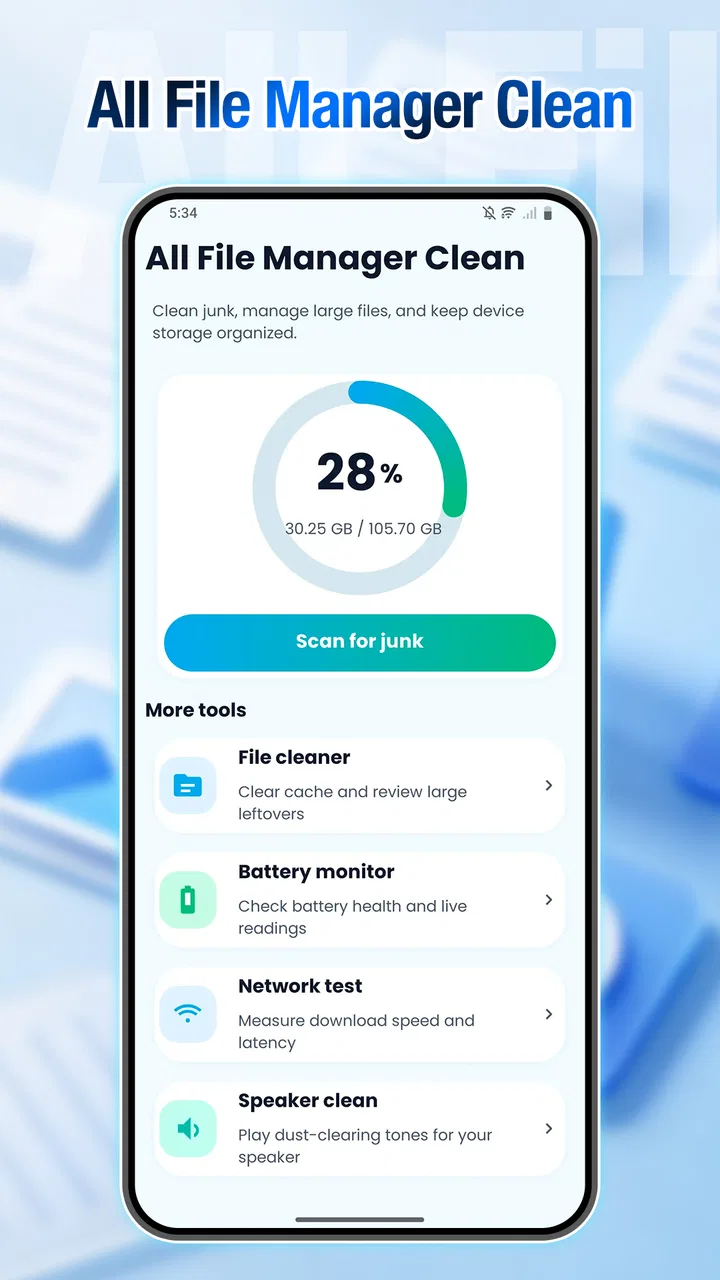
All File Manager Clean
- 3.4
- Rating
- 100.00K
- Installs
- Free
- Price

 Analysis by App-foxy
When my phone starts feeling crowded, I usually do not need another complicated utility. I need to see what is taking up space, decide what is safe to remove, and finish the job without jumping between several screens. That is the main reason All File Manager Clean caught my attention. Developed by Amo Cidades, this free Tools app combines file handling with phone-cleaning tasks in one place, and its central appeal is straightforward: it gives everyday storage maintenance a more direct workflow.
I approached it as a practical file-management tool rather than a magic speed booster. That distinction matters. Cleaning unused files can make a phone easier to manage, but it cannot fix every performance problem or replace sensible storage habits. In my experience, the app is most useful when I use it to understand my files and remove obvious clutter, not when I expect a single tap to transform an older device.
Why the file-cleaning capability matters
The strongest idea here is the connection between browsing files and cleaning the phone. Many storage tools focus almost entirely on a large cleanup button, while ordinary file managers make you inspect folders one by one. All File Manager Clean sits between those approaches. It is intended for people who want a cleaner phone but still want some awareness of what they are managing.
You May Also Like

 Blood Strike: 2.5 Anniversary
Blood Strike’s Loadouts Turn Every Drop Into a Tactical Gamble
A close look at Blood Strike’s custom loadouts: how fast access to signature weapons reshapes its battle royale rhythm, rewards preparation, and narrows the gap between fights.

 Pandora - Music & Podcasts
Pandora’s Music Is Easy to Start, but Harder to Recover
Pandora’s strength is its low-effort path from a seed to a station. Its weak spot is how much confidence it asks you to place in connection, setup, and quiet recovery.

 8 Ball Pool
 Is Built on Rivalries, Rematches, and Routine
A close look at the rivalries, rematches, shared routines, and unanswered safety questions that turn a quick pool match into a persistent mobile community.

 Samsung Music
’s Quiet Strength Is Playing What You Already Own
Its reach comes less from spectacle than from dependable access to a personal library. That simplicity is both the app’s strongest retention engine and its ceiling.

 AccuWeather: Weather Radar
AccuWeather Review: A Quick, Clear Forecast for Everyday Decisions
For everyday plans, the best forecast is the one you can understand quickly. AccuWeather makes rain timing, radar, and local conditions easy to act on, with a few trade-offs.

 Hill Climb Racing
Why Hill Climb Racing Still Turns Crashes Into One More Run
A tiny car, a bumpy hill and one more upgrade: Hill Climb Racing keeps resurfacing because its simple chaos makes every near-miss feel personal.
More From Our News Desk



That makes a difference after months of downloading images, documents, videos, and temporary material. The problem is rarely one enormous file. More often, storage disappears through small leftovers scattered across the device. A practical cleaning workflow helps me identify those leftovers before they become an irritating surprise when I try to install an update, record a video, or save an attachment.
The app’s store summary presents it as a smart file-management and phone-cleaning tool, while its short description reduces the idea to file management and cleaning. I think the broader description is the more useful way to understand it: this is not simply a viewer for folders, and it is not only a one-purpose storage scanner. Its value comes from bringing those jobs together.
That combined role also creates the app’s main responsibility. A cleaner must be convenient, but a file manager must encourage caution. Removing a duplicate-looking photo, an old download, or a large video can be helpful, yet the same action can be frustrating if the file still matters. I therefore prefer to treat every suggested cleanup as a review queue rather than an automatic command.
A realistic day-to-day example
Imagine I am preparing for a trip. I have saved tickets, maps, screenshots, several forwarded videos, and a collection of images from conversations. Before leaving, I want room for new photos, but I do not want to delete travel documents accidentally. This is where a combined manager and cleaner makes sense: I can start with the clutter, inspect what is taking space, and leave important folders alone.
My preferred order is simple. I first look for items I recognize as disposable, then check larger personal files, and only after that consider anything less obvious. This approach turns cleaning into a short household chore instead of a blind purge. It also exposes a useful trade-off: the more control I want, the more time I need to spend reviewing results.
For a family member who is uncomfortable navigating storage folders, the single-purpose nature of the task can be reassuring. For someone who already organizes files carefully, the benefit is smaller. That person may prefer the phone’s built-in file browser, where the layout and system integration are already familiar.
What using it feels like in practice
The most important practical question is not whether a cleaner can find unwanted material. It is whether the process helps me make a confident decision. I look for clear grouping, understandable file names, useful previews, and a sensible separation between personal content and disposable clutter. Those details determine whether the app saves time or merely moves the confusion into a different interface.
When I use a tool like this, I avoid starting with the most aggressive option. I begin with categories I can recognize immediately, such as old downloads or files I created for a temporary purpose. Then I review anything that might contain memories, work, or information I may need later. This is a small habit, but it is the difference between convenient maintenance and accidental loss.
Another useful workflow is to clean before a specific task rather than waiting until the phone is completely full. Before recording a long event, downloading an offline playlist, or installing a large application, I can use the file-management view to remove obvious leftovers. The result is more predictable than waiting for a storage warning to appear at the worst possible moment.
I also find it helpful to separate “I do not need this now” from “I will never need this.” A file can be unnecessary for daily use but still worth archiving. All File Manager Clean can support the first decision, but the second remains mine. If a document is important, I would move or back it up before cleaning instead of relying on a deletion screen to protect it.
Where the app offers a useful advantage
The app’s practical advantage is convenience. I do not have to think of file browsing and cleaning as completely separate chores. That is especially valuable for people who know their phones are cluttered but do not want to learn a complicated storage system. The cleaner approach can also make the file manager feel more purposeful: I am not browsing folders without a goal; I am looking for space I can reclaim safely.
It is also a reasonable middle ground for users who find built-in file tools too plain but do not want a full desktop-style manager. A traditional file manager may offer deeper folder control, while a dedicated cleaner may emphasize speed and automation. This app’s appeal is the overlap between the two. The compromise is that it may not satisfy users who want advanced organization on one side or highly automated maintenance on the other.
The current version is 3.0.0, and the app supports Android 9 and later. That gives it a fairly broad place in the Android ecosystem, including devices that are not running the newest operating system. I still recommend checking the app’s behavior on the particular phone before making it part of a regular maintenance routine, because storage layouts and system file handling can feel different across manufacturers.
The trade-offs I would consider first
The biggest trade-off is control versus speed. A quick cleanup is attractive, but careful file management takes attention. If the app presents many possible targets, I would rather spend a few extra moments checking them than approve everything immediately. If I only want a fast, automatic sweep, the phone’s built-in maintenance tools may feel less demanding.
There is also a risk of treating “clean” as synonymous with “better.” A phone with plenty of free storage can still have poor battery life, too many notifications, or a slow application. Removing files does not automatically solve those issues. I see this app as a storage organization aid, not as a universal repair tool.
People with large photo libraries should be particularly thoughtful. Photos and videos are often the files that matter most, and their names or thumbnails may not tell the whole story. I would use the app to locate candidates, then verify personal media manually. If my priority were advanced photo backup, timeline organization, or cloud synchronization, I would choose a dedicated service instead.
Users who manage work documents should apply the same caution. A file that looks old may be part of a tax record, a project archive, or an offline reference set. The better workflow is to identify, review, and then remove—not to assume that age alone proves irrelevance. This is one of the less glamorous realities of cleaning tools, but it is also the most important.
Privacy-minded users may prefer the simplest possible route through the phone’s own storage settings. Any app that helps inspect files needs access to the material it is organizing, so I would read the permission prompts carefully and avoid granting anything unrelated to the task. I would also keep sensitive documents out of a rushed cleanup session. Convenience should not replace judgment.
Three habits that make the tool more useful
First, I would run a short review before a known storage-heavy activity. Cleaning before a trip, a family event, or a software update gives the task a clear purpose. It also makes it easier to judge success: I am not chasing an abstract idea of a faster phone; I am creating enough room for something I actually plan to do.
Second, I would create a personal “do not touch” mental list before opening the cleaner. That might include work folders, camera media, scanned identification, and current travel documents. Even if the interface separates categories, knowing my priorities prevents careless decisions when several files look similar.
Third, I would use the app as a discovery tool for recurring clutter. If I repeatedly find the same kind of download or forwarded media, the long-term fix may be changing my saving habits in the source application. Deleting the same material every week is less efficient than preventing unnecessary copies from accumulating.
A fourth habit is to clean in small sessions. A short, focused review is easier to verify than a massive cleanup after months of neglect. It also reduces the chance that I become impatient and approve items without checking them. In that sense, the app works best as part of routine housekeeping, not as an emergency button pressed when the phone is already unusable.
Who will gain the most from it
I think the best audience is the everyday Android user who regularly downloads files, receives media, and wants a simpler way to reclaim space. The app is also a good fit for someone who understands that cleaning requires a little review but does not want to navigate a deeply technical file system. Its free price lowers the barrier to trying that workflow, and its Everyone content rating makes it approachable for a broad audience.
It may also help people who support relatives’ phones. Instead of explaining several unrelated settings screens, I can guide someone through a single file-and-cleaning routine, provided we review important content together. The useful benefit here is not just reclaimed storage; it is a clearer conversation about what the phone contains and what can safely go.
I would be less likely to recommend it to power users who need detailed folder operations, network storage access, sophisticated archiving, or a complete backup strategy. Those users may be better served by a dedicated file manager or a desktop workflow. I would also skip it if my only goal were diagnosing battery drain or improving application performance, because storage cleanup addresses a narrower problem.
The app has an average rating of 3.4 from around 190 ratings, with roughly 50 written reviews, and it has passed 100 thousand installs. I read those figures as signs of an app that has found a real audience but should still be judged by personal workflow rather than popularity alone. A cleaner can be useful on one phone and unnecessary on another, depending on how carefully the owner already manages storage.
My final take after using the workflow
All File Manager Clean works best when I treat its main capability as guided storage housekeeping. It brings file discovery and cleanup into the same task, which is genuinely convenient for people who want to understand their clutter before removing it. The strongest result is not a dramatic promise of speed; it is the practical ability to prepare a phone for the next download, recording session, trip, or update.
My recommendation comes with one clear condition: review before deleting. The app can make the process easier, but it cannot know the personal value of every screenshot, document, or video. Used carefully, it is a sensible free utility for Android users who want a more approachable route to managing crowded storage. Used carelessly, any cleaner can turn convenience into regret.
For me, that balance defines the experience. I would keep it in mind for routine cleanup and quick storage checks, especially on a phone where files accumulate faster than I remember. I would not use it as a replacement for backups, a dedicated document system, or the phone’s full diagnostic tools. If that distinction matches what you need, Amo Cidades’ app is worth trying on a compatible Android device.
FAQs for All File Manager Clean
01What is All File Manager Clean and what can it do?
All File Manager Clean is an Android utility that combines file management with storage-cleaning tools. After installing it, you can browse folders, locate downloaded files, organize documents, images, videos, and other content, and remove unnecessary items. Its cleaner features are intended to help identify junk files, duplicates, or large files, although you should always review the suggested items before deleting anything important.
02Is All File Manager Clean safe to use for deleting files?
The app can be useful for finding files that are taking up space, but users should not rely on automatic cleaning without checking the results first. Some items may be needed by an application or may contain personal information. Before confirming a deletion, review the file names, locations, and categories carefully, and create a backup of important photos, documents, or downloads if you are unsure.
03Does All File Manager Clean require special permissions?
Because All File Manager Clean needs to scan and organize content stored on your device, it may request access to files, photos, videos, and other media. The exact permissions can vary depending on your Android version and the app release. Grant only the access required for the features you intend to use, and review permissions later in Android Settings if you stop using a particular function.
04Can All File Manager Clean improve my phone’s performance?
The app may help free storage by finding temporary files, unused downloads, duplicate content, or unusually large files. This can make it easier to manage a device with limited space and may help when storage warnings appear. However, a cleaner cannot guarantee a major speed improvement, and deleting files does not replace system updates, uninstalling unused apps, or restarting a phone experiencing broader performance problems.
05Is All File Manager Clean free, and does it contain advertisements or in-app purchases?
Availability, advertising, and payment options can depend on the version distributed through the app store and your region. Before downloading, check the current Google Play listing for information about ads, subscriptions, premium cleaning tools, and any optional purchases. If the app offers an upgrade, compare the additional features with the free file-management and cleaning functions before agreeing to recurring charges.
Pros
- Supports browsing and organizing files in multiple storage locations.
- Clean interface makes common file actions easy to find.
- Useful search tools help locate files quickly.
- Can help identify unnecessary files taking up storage space.
- Lightweight design should run well on many Android devices.
Cons
- Cleaning suggestions may require manual checking before deletion.
- Some advanced features may be limited behind ads or premium access.
- Performance can vary when scanning very large storage folders.
- File previews may not support every format or file type.
- Users should review permissions carefully before granting storage access.

All File Manager Clean
Gallery